



Reviewed by: Y. Garcia
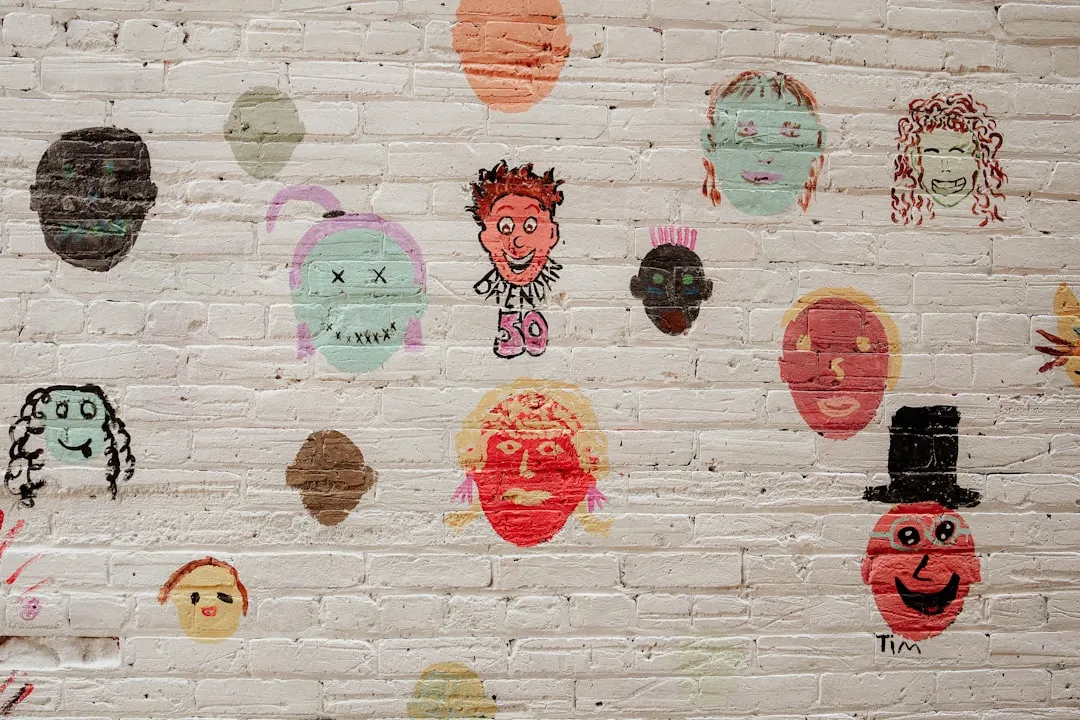
Got overflowing bins of kids' masterpieces but can't bear to toss them? Here's a game-changing way to turn that artwork avalanche into stunning room decor. Instead of letting those drawings collect dust in storage, you can transform your child's creativity into custom wallpaper that makes their space truly one-of-a-kind.
Many families struggle with the same dilemma — homes often accumulate bins, folders, and stacks of children's artwork that feel too precious to discard. But there's a brilliant solution that celebrates your child's imagination while solving your storage problem. Professional services now make it possible to convert artwork into high-quality wallpaper, and design experts call this approach a splurge with big impact. The result? A bedroom where kids can literally be surrounded by their own creativity.
What you'll need
Materials
Selected children's artwork (1-3 pieces work best)
High-resolution scanner or smartphone with scanning app
Computer with photo editing software (PicMonkey, Canva, or similar)
Custom wallpaper printing service (Detroit Wallpaper, Spoonflower, or local print shop)
Tools
Scanner or smartphone camera
Computer or tablet
Standard wallpaper installation tools (if DIY hanging)
Safety first
Adult supervision required for all scanning and digital editing steps
Ensure proper ventilation when installing wallpaper with adhesives
Use non-toxic wallpaper adhesives, especially in children's rooms
Test wallpaper samples for any allergic reactions before full installation
Choosing and preparing the artwork
Success starts with selecting artwork that will translate beautifully from paper to walls. Experts suggest keeping one artwork from each year to make the selection manageable, but for wallpaper, you'll want to be even more strategic.
1. Pick your star pieces. Choose 1-3 drawings that showcase your child's style and use colors that complement the room. Bold, colorful pieces work best because they create visual impact when repeated across walls — delicate pencil sketches or watercolors with subtle details often lose their charm when scaled for wallpaper production.
Why bold works better: Large motifs and bright colors maintain their impact when viewed from across the room, while intricate details can appear muddy or disappear entirely when printed at wallpaper scale.
2. Digitize with precision. Turn to your tech, and photograph or scan each piece at the highest quality setting your equipment allows. This step determines your final wallpaper quality, so don't rush it.
For best results, scan at 300 DPI or higher. If using a smartphone, position it directly above the artwork with consistent lighting to avoid shadows that show up as dark patches in the final print.
Tip: Take multiple shots from slightly different angles if using a phone camera — you can choose the clearest one during editing.
3. Enhance the digital files. Open your scanned images in editing software and adjust brightness, contrast, and color saturation to restore vibrancy that scanning often diminishes. This is where you can use PicMonkey for things like that to bring artwork back to life digitally.
If colors look washed out: Increase saturation by 10-20% to compensate for the flattening effect of digitizing. Most children's artwork benefits from slight contrast boosting to make colors pop.
Design your wallpaper pattern
With high-quality digital files ready, you'll transform individual artwork into a wallpaper design. This bridges the gap between preserving a single drawing and creating an entire room environment.
4. Plan your layout strategy. Choose one piece for a feature wall or create a pattern for all four walls, but first consider how the artwork will function as wallpaper. A single dramatic piece works well behind a bed, while smaller repeated elements suit full-room coverage.
5. Size elements appropriately. For wallpaper impact, main design elements should measure 12-24 inches wide when repeated. Smaller details disappear from normal viewing distances, while oversized elements can overwhelm a child's bedroom and make the space feel chaotic rather than cozy.
6. Create seamless repeats. This technical step separates amateur from professional-looking wallpaper. Use your editing software to create a tile pattern where edges connect smoothly when repeated — visible seams destroy the wallpaper effect.
Tip: Preview your pattern by copying and pasting it in a grid formation within your editing software. This reveals alignment issues before you commit to printing.
Why seamless matters: Professional wallpaper installations depend on pattern matching at seams. Poor alignment creates visual interruptions that draw attention away from the artwork itself.
Professional printing and installation
Your digital preparation work now transforms into physical wallpaper through professional services that understand both artistic preservation and technical printing requirements.
7. Research printing specialists. Look beyond basic print shops to services that specialize in custom wallpaper production. Design experts often turn to the pros at Detroit Wallpaper to make it happen because they understand both color matching and material selection for children's spaces.
8. Select child-appropriate materials. For kids' rooms, specify wipeable vinyl or washable paper that handles everyday wear — crayon marks, sticky fingerprints, and the occasional juice spill. Standard wallpaper materials aren't designed for active children's environments.
9. Calculate coverage accurately. Measure wall dimensions carefully, including windows and doors, then add 10% extra for trimming and potential mistakes. Professional services help with calculations, but accurate measurements prevent costly reprints or shortages mid-installation.
10. Request sample prints first. Colors display differently on computer screens versus printed wallpaper. A small sample (typically 12x12 inches) lets you verify color accuracy and material quality before committing to full production runs.
11. Install with precision. Follow manufacturer guidelines for adhesive application and pattern alignment. If you're new to wallpaper installation, consider hiring professionals — especially for patterns requiring precise matching, since misaligned artwork loses its visual impact.
If installing yourself: Work from top to bottom, using a smoothing tool to eliminate air bubbles as you go. Take extra time at seams to ensure pattern continuity.
Cleanup & disposal
Store any leftover wallpaper pieces flat in a cool, dry place for future touch-ups — children's rooms see more wear than adult spaces, making repairs likely over time. Dispose of adhesive containers according to local hazardous waste guidelines, as many wallpaper adhesives contain chemicals requiring special handling.
Clean tools immediately with warm, soapy water before the adhesive fully cures, and keep the original artwork in a safe place for potential future projects or sentimental value.
Troubleshooting
Problem: Pattern doesn't line up at seams → Fix: Double-check measurements and ensure you're following the manufacturer's match marks exactly — even small deviations compound across multiple strips
Problem: Wallpaper bubbles or wrinkles → Fix: Use a smoothing tool to work air bubbles toward edges, or carefully lift and reapply that section with fresh adhesive
Problem: Colors look different than expected → Fix: This highlights why sample prints matter — request test prints before full orders to verify color accuracy under room lighting
Variations & upgrades
Budget option: Create a large-format poster print (24x36 inches or larger) instead of full wallpaper for dramatic impact behind the bed at a fraction of wallpaper cost
Removable version: Use peel-and-stick wallpaper material for renter-friendly installation that removes without wall damage when moving or redecorating
Mixed media approach: Combine artwork with professional enhancement services that digitally clean up and optimize designs, add complementary backgrounds, or integrate multiple pieces into cohesive patterns
Why this works so well
Design experts note that children find it magical to sleep in rooms created by their own imagination, but the benefits extend beyond the initial wow factor. This approach addresses the practical storage dilemma while creating deeply personal spaces that evolve with children.
Unlike generic wallpaper with licensed characters that kids outgrow, custom artwork wallpaper represents their creative journey and develops their sense of ownership over personal space. The psychological impact builds confidence — when children see their work treated with this level of respect and permanence, it validates creative expression in powerful ways.
Why it resonates long-term: Rather than a temporary decoration, this becomes a visual reminder of childhood creativity that grows more meaningful over time. Teen years often bring a new appreciation for these childhood expressions of imagination.
Making it last
Not every piece of art needs permanent display — choose pieces that capture your child's personality and artistic development rather than trying to preserve everything. This selective approach creates a stronger visual impact while keeping projects manageable and budgets reasonable.
Can you imagine how special and magical it would be for a child to go to bed every night in a room that was created by their own imagination? The beauty of this technique transforms everyday creativity into extraordinary room environments. Your child's bedroom becomes a gallery celebrating their imagination — proof that the most meaningful decor often comes from the heart, not the store.

Comments
Be the first, drop a comment!